Almost every TikTok comment export tool hands you the top-level comments only. That is fine if you are counting sentiment or pulling usernames for a giveaway, but it means you are throwing away the half of the comment section where the actual conversation happens: the objection someone raised, the creator's answer, the three people who piled on to say "same problem here."
This guide covers how to export TikTok comment replies alongside the parent comments, how to rebuild the full thread in Excel or Google Sheets from the reply_to_id column, why the reply count you download never matches the one TikTok displays, and what to actually do with threaded data once you have it.
What a "reply" actually is on TikTok
TikTok's comment system is two levels deep — and only two. There are:
- Top-level comments — posted directly on the video. These are what a normal export gives you.
- Replies (child comments) — posted underneath a top-level comment. In the app they sit behind a "View N replies" tap.
Unlike Reddit, there is no unlimited nesting. If you reply to a reply, TikTok still attaches it to the same top-level parent and prefixes the text with an @username mention. That flat, two-level structure is good news for spreadsheets: one parent column is enough to reconstruct every thread, and you never need recursion.
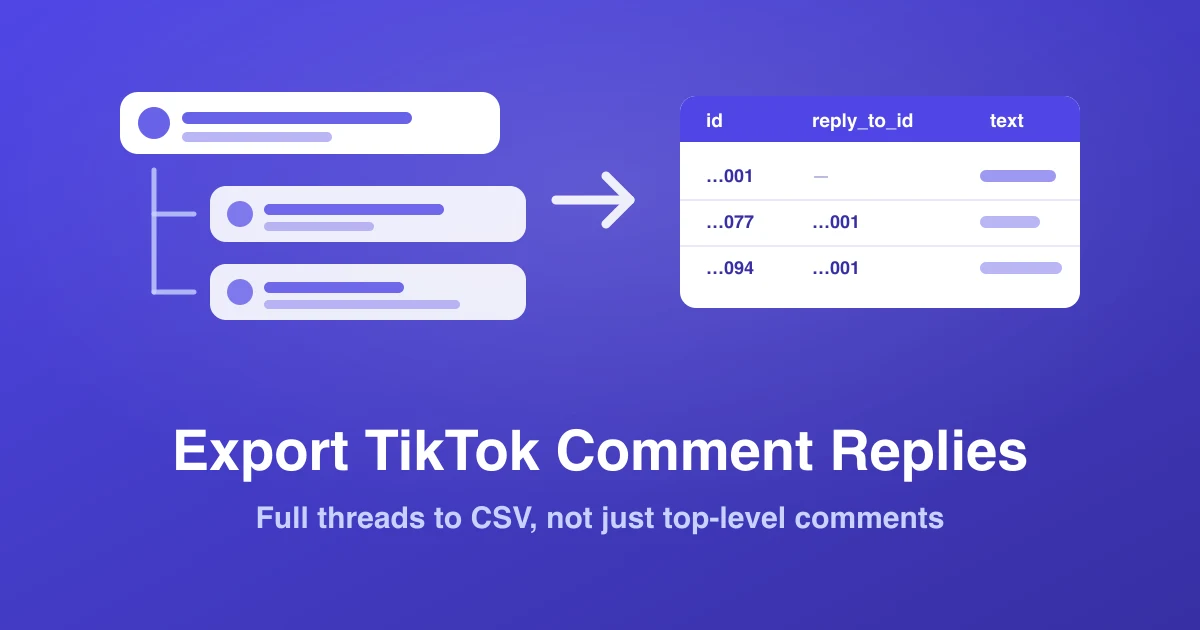
Each comment carries its own ID. A reply also carries a pointer to its parent. In a ZocialComment export those are the id and reply_to_id columns — for a top-level comment reply_to_id is empty, and for a reply it holds the id of the comment it sits under. That single field is the whole thread graph.
Why replies are worth the extra fetch
Top-level comments are reactions. Replies are conversations — and conversations are where intent lives. Four things only exist in the reply layer:
1. Objections and their answers
The top-level comment says "looks expensive." The reply thread underneath is where five people argue about whether it is worth it, and where the creator or seller either wins the sale or doesn't. If you are doing product research from comments, the objection-handling thread is the single most valuable text on the page.
2. The questions that never got answered
Export a competitor's video with replies on, filter for rows ending in a question mark, then check which of those parent comments have zero replies from the creator's handle. That list is a map of unmet demand — the exact gap the competitor-spying playbook tells you to walk into.
3. Real reply latency
Because every row carries a UTC timestamp, you can subtract the parent's timestamp from the creator's reply timestamp and get a true median response time. Social-commerce sellers tend to badly overestimate their own — see our breakdown of the 24-hour reply rule for why that number moves revenue.
4. Sentiment that reverses
A top-level comment reading "this is fake" scores as negative. Its reply thread, where the original commenter says "ok I was wrong, just got mine, it works," never enters a top-level-only dataset. Sentiment scored without replies systematically over-weights first impressions and under-weights resolution.
Step-by-step: exporting replies
1. Copy the video URL
All of these forms work:
https://www.tiktok.com/@{user}/video/{id}https://www.tiktok.com/@{user}/photo/{id}— photo/slideshow posts have comment sections toohttps://vm.tiktok.com/...— short share links resolve automatically
2. Paste it into the exporter
Go to zocialcomment.com/export/tiktok and paste the URL. One video per export — each downloads as its own file. No TikTok login is involved at any point; only publicly visible comments are ever read.
3. Download — replies are already in there
There is no box to tick. Replies are included by default, expanded into their own rows alongside the top-level comments, so the file you download is the full conversation rather than the top layer of it.
The reason for the default: every parent comment that has replies requires its own extra request upstream. A video with 2,000 top-level comments where half have replies means roughly 1,000 additional fetches. On a busy video, a replies-on export can take several times as long as a top-level-only one, so it is opt-in rather than automatic.
4. Export and download
Click Export Comments. You will see the live comment preview before anything is charged or downloaded. Then pick your format:
- CSV (UTF-8) — the default, opens anywhere
- Excel (.xlsx) — pre-formatted, no encoding step needed
- JSON — if you are feeding a script or an LLM
What the file looks like
Replies are not nested inside their parents — they are flattened into their own rows, so the file stays a plain rectangular table that Excel, Sheets, pandas and every BI tool can read without preprocessing.
| Column | Top-level comment | Reply |
|---|---|---|
id | 7412…001 | 7412…077 |
reply_to_id | (empty) | 7412…001 |
replies | 3 | 0 |
text | does it ship to Malaysia? | @user yes, 5–7 days |
The rest of the columns are identical for both row types: author, username, avatar_url, likes, created_at (UTC), language, and is_pinned. That uniformity is deliberate — you can sort, pivot and filter the whole sheet without special-casing replies.
Rebuilding the thread in Excel or Google Sheets
Three techniques, in increasing order of usefulness.
Attach each reply to its parent's text
Assuming id is column J and reply_to_id is column K, with the comment text in column D:
=IFERROR(XLOOKUP(K2, $J$2:$J$5000, $D$2:$D$5000), "— top level —")
Drop that in a new column and every reply row now shows the comment it is answering, right next to its own text. In older Excel or Sheets, =IFERROR(INDEX($D$2:$D$5000, MATCH(K2, $J$2:$J$5000, 0)), "— top level —") does the same job.
Sort so threads read top to bottom
Add a helper column that resolves to the thread's root ID for every row:
=IF(K2="", J2, K2)
Sort by that helper column, then by created_at ascending. Every thread now appears as a contiguous block in chronological order — the closest thing to reading the app, but searchable and 10,000 rows long.
Find the busiest threads
=COUNTIF($K$2:$K$5000, J2) counts how many replies each parent actually received in your file. Sort descending and the top 20 rows are the arguments, the questions and the pile-ons worth reading in full — usually a much better use of an hour than skimming the top 200 comments by likes.
Isolate one thread
Copy the parent comment's id, then filter reply_to_id to that value. That is the answer to "can I export the replies to just one comment" — export the video, filter afterwards.
Why your reply count won't match TikTok's
This is the most common support question, and in almost every case nothing is broken. TikTok's on-screen counter and any public export are counting different things.
The counter includes comments that are:
- Filtered by the creator — TikTok lets creators auto-hide comments containing chosen keywords, or hold all comments for manual review. TikTok's comment filter settings hide these from everyone except the creator, but they can still be counted.
- From deleted, banned or newly-private accounts — TikTok removes over 100 million pieces of content per quarter under its Community Guidelines Enforcement Reports, and a chunk of that is comments. Counters do not always decrement immediately.
- Deleted by their author after the fact.
- Shadow-limited — served to the author but not to the public feed.
On top of that, TikTok's own reply_comment_total field on a parent comment is itself a server-side count that can exceed the number of replies the API will actually serve. Our exporter takes the larger of "what the counter says" and "how many rows we actually retrieved" when reporting totals, precisely so the progress number never goes backwards mid-export.
Practical rule: expect the exported total to land somewhere between 85% and 100% of the displayed count on a healthy video, and lower on videos with aggressive comment filtering. If yours is dramatically lower, the usual culprit is a video where the creator has restricted who can comment. Our guide on TikTok comments not loading covers the rest of the failure modes.
The alternatives, honestly compared
| Method | Gets replies? | Effort | Best for |
|---|---|---|---|
| Copy/paste from the app | Yes, manually | Brutal past ~50 comments | One thread you already found |
| TikTok Research API | Yes | Application + academic affiliation required | University research projects |
| Writing your own scraper | Yes, if you build reply pagination | Days, plus ongoing maintenance | Engineering teams with a long-term need |
| ZocialComment | Yes — one checkbox | Under a minute | Everyone else |
The Research API is genuinely good and genuinely free, but access is gated to approved researchers at qualifying institutions, and the approval cycle is measured in weeks. If you are writing your own, budget for the part nobody warns you about: reply pagination uses a different cursor from the top-level comment cursor, and it resets per parent comment. That is the piece most homegrown scrapers get wrong — see our TikTok scraper guide for the full architecture.
Four things to do with threaded data
Unanswered-question audit
Filter text for rows containing "?", then flag any whose id never appears in the reply_to_id column. Every flagged row is a customer who asked and got silence. On TikTok Shop videos this list converts directly — see buyer signals in TikTok Shop comments.
Creator vetting
When you are vetting an influencer, replies expose what a follower count cannot: does the creator actually answer people, and are the repliers real accounts or the same six usernames on every video? A high like count with a dead reply layer is a strong engagement-pod signal — the pattern our fake comment detection guide walks through in detail.
Brand-mention monitoring in depth
Your brand often gets named in a reply ("try @brand, it's cheaper") rather than a top-level comment. Monitoring only top-level comments misses a large share of organic recommendations. Run =COUNTIF(D2:D5000,"*yourbrand*") on a replies-on export versus a replies-off one from the same video and you will usually find a meaningful gap. More on this in monitoring TikTok brand mentions.
Feeding an LLM
Export as JSON with replies on, and the parent/child structure gives a model the conversational context it needs to summarise accurately. A model reading top-level comments alone will confidently report a complaint that was resolved three replies later. If you would rather skip the prompt engineering, the built-in AI analysis does sentiment, themes and buyer intent over the whole thread automatically — covered in how to analyse TikTok comments.
Replies on the other platforms
The threading model is not the same everywhere, and it changes what a "reply export" even means:
| Platform | Nesting | How replies arrive in the export |
|---|---|---|
| TikTok | 2 levels (flat under a parent) | Opt-in checkbox; one row per reply with reply_to_id |
| 2 levels | Replies come as rows pointing at their parent comment | |
| Threads | 2 levels | The reply layer is the post's comment section |
| Unlimited | The whole tree is flattened, with parent IDs and a depth value per row | |
| YouTube | 2 levels | Replies attach to their top-level comment |
Reddit is the interesting outlier: because nesting is unlimited, a single popular thread can produce more rows than an entire TikTok video, and the depth column matters as much as the parent ID. Our Reddit thread export guide covers reading those files.
Three mistakes to avoid
- Exporting twice. If you already ran a replies-off export and then decide you want the threads, you pay for both. On any video where the conversation matters, tick the box the first time.
- Deduplicating on text. Replies frequently repeat their parent's wording or start with an
@usernamemention of it. Deduplicate on theidcolumn, never ontext, or you will silently delete real replies. - Counting reply rows as unique commenters. One person answering five people produces five rows. For audience sizing, run a distinct count on
username, not a row count — the same discipline the engagement rate calculator guide applies.
Limits and pricing
The free tier exports the first 100 comments of any video with no signup and no daily limit — enough to test the reply structure on a real video before committing. The 3-Day Pass unlocks unlimited videos for 3 days at up to 10,000 comments per post, and replies count toward that same 10,000. The Pro Pass adds AI analysis on top.
One planning note: because replies are extra rows, a video with 6,000 top-level comments and a lively reply layer can hit the 10,000-row ceiling. If you are near that line and only need reply data for the busiest threads, run one replies-off export first, find the high-replies parents, and decide from there.
Related reading
- How to export TikTok comments — the general guide
- TikTok comments to Excel — encoding and formulas
- Exporting every comment on a video — pagination limits explained
- TikTok Comment Exporter — 3 free exports a day, no signup